
搜索到
464
篇与
的结果
-
 五、流量管理 - VirtualService 通过 VirtualService,可以定义流量路由规则字段名说明spec.hosts定义路由规则关联一组的hosts,可以是带有通配符的DNS名称或者IP地址(IP地址仅能应用于来源流量为边缘代理网关)。该字段能应用于 HTTP 和 TCP 流量。在 Kubernetes 环境中,可以使用 service 的名称作为缩写,lstio 会按照 VirtualService 所在 namespace 补齐缩写,例如在 default namespace 的 VirtualService 包含 host 缩写 reviews 会被补齐为 reviews.default.svc.cluster.local,为避免误配置,推荐填写 host 全称。spec.gateway定义应用路由规则的来源流量,可以是一个或多个网关,或网格内部的 sidecar,指定方式为[gateway namespace]/[gateway name],保留字段 mesh 表示网格内部所有的 sidecar,当该参数缺省时,会默认填写 mesh,即该路由规则的来源流量为网格内部所有的 sidecar。spec.http定义一组有序的(优先匹配靠前的路由规则)应用于 HTTP 流量的路由规则,HTTP 路由规则会应用于网格内部的 service 端口命名为http-, http2-,grpc- 开头的流量以及来自 gateway 的协议为 HTTP,HTTP2,GRPC,TLS-Terminated-HTTPS 的流量。spec.http.match定义路由的匹配规则列表,单个匹配规则项内所有条件是且关系,多个匹配规则之间为或关系。spec.http.route定义路由转发目的地列表,一条 HTTP 路由可以是重定向或转发(默认),转发的目的地可以是一个或多个服务(服务版本),同时也可以配置权重、header 操作等行为。spec.http.redirect定义路由重定向,一条 HTTP 路由可以是重定向或转发(默认),如规则中指定了 passthrough 选项,route.redirect 均会被忽略,可将 HTTP 301重定向到另外的 URL 或Authority。spec.http.rewrite定义重写HTTP URL 或 Authority headers,不能与重定向同时配置,重写操作会在转发前执行。spec.http.timeout请求超时时间spec.http.retries请求重试次数spec.http.fault故障注入策略,开启时超时和重试策略不生效spec.http.mirror定义将 HTTP 流量复制到另一个指定的目的端,被复制的流量按照“best effort”原则,sidecar / 网关不会等待复制流量的响应结果就会从源目的端返回响应。spec.http.mirrorPercent定义镜像流量的复制百分比,默认值为100,即100%spec.http.corsPolicy定义 CORS 策略spec.http.headers定义 header 操作规则,包括 request 和 response header 的增删改。spec.tcp定义一组有序的(优先匹配靠前的路由规则)应用于 TCP 流量的路由规则,该规则会应用于任何非 HTTP 和 TLS 的端口。spec.tcp.match定义路由的匹配规则列表,单个匹配规则项内所有条件是且关系,多个匹配规则之间为或关系。spec.tcp.route定义 TCP 连接转发的目的端。spec.tls定义一组有序的(优先匹配靠前的路由规则)应用于未终止的 TLS 或 HTTPS 流量的路由规则,该路由规则会应用于网格内部的 service 端口命名为 https-,tls- 开头的流量,来自 gateway 的端口协议为 HTTPS,TLS 的未终止加密流量,ServiceEntry 使用 HTTPS,TLS 协议的端口,当 https-,tls- 端口未关联 VirtualService 规则时将会被视为 TCP 流量。spec.tls.match定义 TLS 流量路由的匹配规则列表,单个匹配规则项内所有条件是且关系,多个匹配规则之间为或关系。spec.tls.route定义连接转发的目的端2.1 routeHTTP Route 规则的功能:满足 HTTPMatchRequest 条件的流量都会被路由到 HTTPRouteDestination,执行重定向(HTTPRedirect)、重写(HTTPRewrite)、重试(HTTPRetry)、故障注入(HTTPFaultInjection)、跨站(CorsPolicy)等策略。2.2 matchmatch 是路由的匹配规则,支持 uri、scheme、method、authority 等字段,且支持 perfix(前缀)、exact(精确)、regex(正则)三种匹配模式:# 匹配 uri 以 test 开头的请求 - match: - uri: prefix: "/test"# 匹配 header 中 key 为 source,value 为 abc 的请求 - match: - headers: source: exact: abc# 根据来源标签匹配 - match: sourceLabels: app: nginx version: v1# 匹配 header 中 key 为 source,value 为 test1 的请求 或 uri 以 test2 开头的请求 - match: - headers: source: exact: abc uri: prefix: "/test1" - uri: prefix: "/test2"2.3 路由目标(RouteDestionation)在 HTTPRouteDestionation 中主要包含三个字段:destination(请求目标)、weight(权重)、headers(请求头),其中 destination 必填。destination:通过 host、subset 和 port 三个属性描述,表示最终将流量路由到此目标。host 是 Destination 必选字段,表示在 lstio 中注册的服务名(建议写全域名),subset 表示在 host 上定义的一个子集,如:在灰度发布中将版本定义为 subset,配置路由策略会将流量转发到不同版本的 subset 上。spec: hosts: - test.com http: - route: - destination: host: test.com subset: v1 destination: host: test.com subset : v2weight:表示流量分配的比例,在一个 route 下多个 destination 的 weight 总和要求是100(默认100,必填字段)。如:从原有的 v1 版本中切分 20% 的流量到 v2 版本,这也是灰度发布常用的一个流量策略,即不区分内容,平等的从总流量中切出一部分流量给新版本。spec: hosts: - test.com http: - route: - destination: host: test.com subset: v1 weight: 80 destination: host: test.com subset : v2 weight: 20headers:提供了对 HTTP header 的一种操作机制,可以修改一次 HTTP 请求中的Request 或 Response 的值,包含 request 和 response 两个字段。request:表示在发请求给目标地址时修改 Request 的 headerresponse:表示在返回应答时修改 Response 的 header对应的类型都是 HeaderOperations 类型,使用set、add、remove字段来定义对 Header 的操作set:使用map上的key和value覆盖 Request 和 Response 中对应的 Headeradd:追加map上的key和value到原有的 Headerremove:删除在列表中指定的 Header2.4 HTTP重定向(HTTPRedirect)HTTPRedirect 包含两个字段来表示重定向的目标:uri:替换 URL 中的 uri 部分authority:替换 URL 中的 authority 部分# 对 nginx 服务中,所有前缀为 test1 的请求都会被重定向到 new-test 的 /test/a1 地址 apiVersion: networking.istio.io/v1alpha3 kind: VirtualService metadata: name: nginx namespace: test spec: hosts: - test.com http: - match: - uri: prefix: /test1 redirect: uri: /test/a1 authority: new-test.com2.5 HTTP重写(HTTPRewrite)通过 HTTP 重写可以在将请求转发给目标服务前修改 HTTP 请求中指定部分的内容,HTTP 重写对用户是不可见的(在服务端执行)HTTPRewrite 包含两个字段:uri:重写 URL 中的 uri 部分authority:重写 URL 中的 authority 部分和 HTTPRedirect 规则稍有不同的是,HTTPRedirect 的 uri 只能替换全部的 path,但 HTTPRewrite 的 uri 是可以重写前缀的,即匹配条件是前缀匹配,则只修改匹配到的前缀。# 将请求前缀中的 /test1 重写为 /test/a1 apiVersion: networking.istio.io/v1alpha3 kind: VirtualService metadata: name: nginx namespace: test spec: hosts: - test.com http: - match: - uri: prefix: /test1 rewrite: uri: /test/a1 route: - destination: host: new-test2.6 HTTP重试(HTTPRetry)HTTPRetry 可以定义请求失败时的重试策略,包含三个字段:attempts:必选字段,定义重试的次数perTryTimeout:每次重试超时的时间,单位可以是 ms、s、m和hretryOn:进行重试的条件,多个条件时以逗号分隔5xx:在上游服务返回 5xx 应答码,或者在没有返回时重试gateway-error:类似于5xx异常,只对502、503和504应答码进行重试connect-failure:在链接上游服务失败时重试retriable-4xx:在上游服务返回可重试的4xx应答码时执行重试refused-stream:在上游服务使用 REFUSED_STREAM 错误码重置时执行重试cancelled:gRPC 应答的 Header 中状态码是 cancelled 时执行重试deadline-exceeded:在 gRPC 应答的 Header 中状态码是 deadline-exceeded 时执行重试internal:在 gRPC 应答的 Header 中状态码是 internal 时执行重试resource-exhausted:在 gRPC 应答的 Header 中状态码是 resource-exhausted 时执行重试unavailable:在 gRPC 应答的 Header 中状态码是 unavailable 时执行重试apiVersion: networking.istio.io/v1alpha3 kind: VirtualService metadata: name: nginx namespace: test spec: hosts: - test.com http: - route: - destination: host: test.com retries: attempts: 3 perTryTimeout: 5s retryOn: 5xx,connect-failure2.7 HTTP流量镜像(HTTPMirror)HTTP 流量镜像指的是将流量转发到原目标地址的同时将流量给另外一个目标地址镜像一份。把生产环境中的实际流量镜像一份到另外一个系统上,完全不会对生产系统产生影响,这里只是镜像了一份流量,数据面代理只需要关注原来转发的流量就可以,不用等待镜像目标地址的返回。apiVersion: networking.istio.io/v1alpha3 kind: VirtualService metadata: name: nginx namespace: test spec: hosts: - test.com http: - route: - destination: host: test.com subset: v1 mirror: host: test.net subset: v22.8 HTTP故障注入(HTTPFaultInjection)HTTPFaultInjection 通过 delay 和 abort 设置延时和中止两种故障,分别表示 Proxy 延迟转发和终止 HTTP 请求。delay 包含以下两个字段:fixedDelay:必选,表示延迟时间,单位可以是毫秒,秒,分钟和小时,要求至少要大于1毫秒percentage:延时作用在多少比例的请求上# 让 1.5% 的请求延时 5s apiVersion: networking.istio.io/v1alpha3 kind: VirtualService metadata: name: nginx namespace: test spec: hosts: - test.com http: - route: - destination: host: test.com subset: v1 fault: delay: fixedDelay: 5s percentage: value: 1.5abort 包含以下两个字段:httpStatus:必选,http 状态码percentage:终止故障作用在多少比例的请求上# 让 1.5% 的请求返回 500 apiVersion: networking.istio.io/v1alpha3 kind: VirtualService metadata: name: nginx namespace: test spec: hosts: - test.com http: - route: - destination: host: test.com subset: v1 fault: abort: httpStatus: 500 percentage: value: 1.52.9 HTTP跨域资源共享(CorsPolicy)在 VirtualService 中可以对满足条件的请求配置跨域资源共享,allowOrigin,allowMethods,allowHeader,exposeHeader,maxAge,allowCredentials,等都被转化为 Access-Control-* 的 Header。# 允许来自 new-test.com 的 GET 请求 apiVersion: networking.istio.io/v1alpha3 kind: VirtualService metadata: name: nginx namespace: test spec: hosts: - test.com http: - route: - destination: host: test.com subset: v1 corsPolicy: allowOrigin: - new-test.com allowMethod: - GET maxAge: 2d
 -
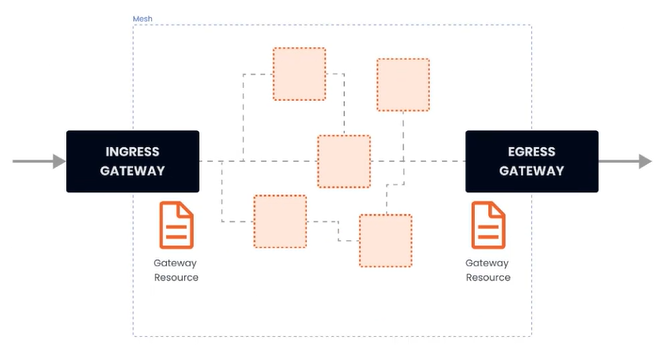
四、流量管理 - Gateway 在安装 istio 的时候,同时安装了入口和出口网关,这两个网关都运行了一个 Envoy 代理实例,它们在网格的边缘作为负载均衡器的角色。gateway 资源实例:apiVersion: networking.istio.io/v1alpha3 kind: Gateway metadata: name: gateway-demo namespace: default spec: selector: istio: ingressgateway servers: - port: number: 80 name: http protocol: HTTP hosts: - dev.example.com - test.example.com 上述示例做了哪些事:配置了一个代理,作为负载均衡器服务端口为80应用于 istio 入口网关代理hosts 字段作为过滤器,只有以 dev.example.com 和 test.example.com 为目的地的流量才允许通过为了控制和转发流量到集群内运行的实际实例,还需要配置 VirtualService,并与网关相连接。(1)简单路由实例部署 nginx,并通过 istio 网关进行访问--- apiVersion: apps/v1 kind: Deployment metadata: namespace: test name: nginx labels: app: nginx spec: replicas: 1 selector: matchLabels: app: nginx template: metadata: labels: app: nginx spec: restartPolicy: Always containers: - image: 'nginx:latest' imagePullPolicy: IfNotPresent name: nginx env: - name: TZ value: Asia/Shanghai ports: - containerPort: 80 protocol: TCP --- apiVersion: v1 kind: Service metadata: namespace: test name: nginx labels: app: nginx spec: ports: - port: 80 targetPort: 80 protocol: TCP selector: app: nginx# 网关 apiVersion: networking.istio.io/v1alpha3 kind: Gateway metadata: name: gateway-nginx namespace: test spec: selector: istio: ingressgateway servers: - port: number: 80 name: http protocol: HTTP hosts: - '*'在未绑定 VirtualService 之前,网关还不知道要将流量路由到哪apiVersion: networking.istio.io/v1alpha3 kind: VirtualService metadata: name: virtualService-nginx namespace: test spec: hosts: - '*' gateways: - gateway-nginx http: - route: - destination: host: nginx.test.svc.cluster.local port: 80部署完之后,通过 curl -v x.x.x.x 即可测试
-
三、安装 以 istioctl 为例# 下载 curl -L https://istio.io/downloadIstio | sh - cd istio-1.28.1 export PATH=$PWD/bin:$PATH安装目录包含:samples/ 目录下的示例应用bin/ 目录下的 istioctl 客户端可执行文件。# 安装 istioctl install --set profile=demo -y |\ | \ | \ | \ /|| \ / || \ / || \ / || \ / || \ / || \ /______||__________\ ____________________ \__ _____/ \_____/ √ Istio core installed √ Istiod installed √ Ingress gateways installed √ Egress gateways installed √ Installation complete istio 提供的几种内置配置,这些配置文件提供了对 Istio 控制平面和 Istio 数据平面 Sidecar 的定制内容:default:根据 IstioOperator API 的默认设置启动组件。 建议用于生产部署和 Multicluster Mesh 中的 Primary Cluster。您可以运行 istioctl profile dump 命令来查看默认设置。demo:这一配置具有适度的资源需求,旨在展示 Istio 的功能。 它适合运行 Bookinfo 应用程序和相关任务。 此配置文件启用了高级别的追踪和访问日志,因此不适合进行性能测试。minimal:与默认配置文件相同,但只安装了控制平面组件, 它允许您使用 Separate Profile 配置控制平面和数据平面组件(例如 Gateway)。remote:配置 Multicluster Mesh 的 Remote Cluster。empty:不部署任何东西。可以作为自定义配置的基本配置文件。preview:预览文件包含的功能都是实验性。这是为了探索 Istio 的新功能,不确保稳定性、安全性和性能(使用风险需自负)。 defaultdemominimalremoteemptypreview核心组件 istio-egressgateway √ istio-ingressgateway√√ √istiod√√√ √# 给命名空间添加标签,指示 Istio 在部署应用的时候,自动注入 Envoy Sidecar 代理 kubectl label namespace [default] istio-injection=enabled安装 Kubernetes Gateway API CRDKubernetes Gateway API CRD 在大多数 Kubernetes 集群上不会默认安装, 在使用 Gateway API 之前需要安装$ kubectl get crd gateways.gateway.networking.k8s.io &> /dev/null || \ { kubectl kustomize "github.com/kubernetes-sigs/gateway-api/config/crd?ref=v1.4.0" | kubectl app
-
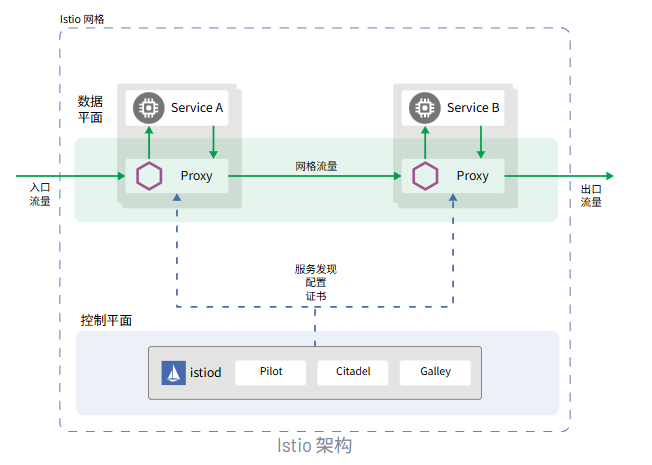
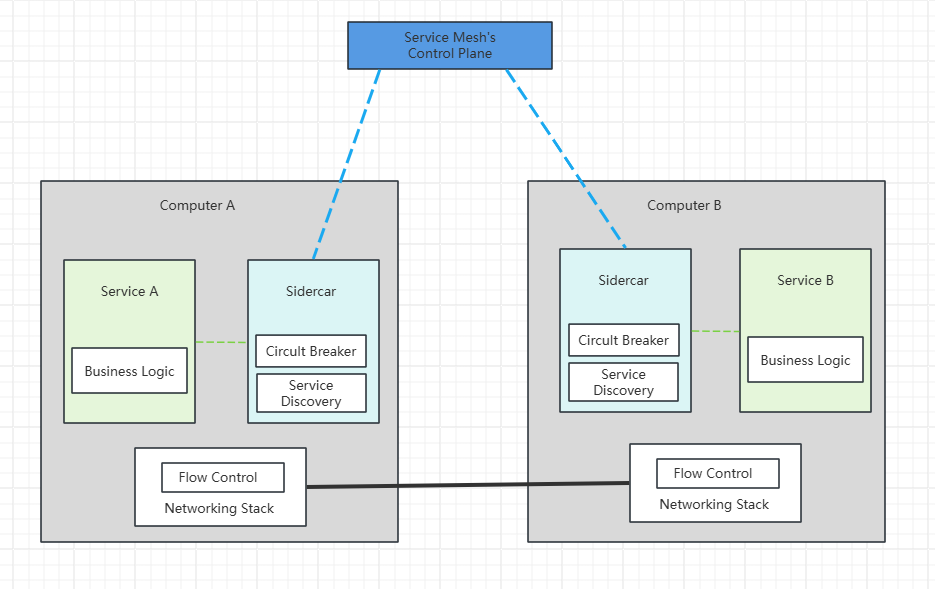
二、Istio 官网:https://istio.io/latest/zh/Istio 是一种开源服务网格,可透明地分层到现有的分布式应用程序上。 Istio 的强大功能提供了一种统一且更高效的方式来保护、连接和监控服务。 Istio 是实现负载均衡、服务到服务身份验证和监控的途径 - 几乎无需更改服务代码。包含以下功能:使用双向 TLS 加密、强大的基于身份的身份验证和鉴权在集群中保护服务到服务通信HTTP、gRPC、WebSocket 和 TCP 流量的自动负载均衡使用丰富的路由规则、重试、故障转移和故障注入对流量行为进行细粒度控制支持访问控制、限流和配额的可插入策略层和配置 API集群内所有流量(包括集群入口和出口)的自动指标、日志和链路追踪Istio 服务网格从逻辑上划分为数据平面和控制平面数据平面:由一组被部署为 Sidercar 的智能代理(Envoy)组成,负责协调和控制微服务之间的所有网络通信,同时也收集和报告所有网格流量的遥测数据控制平面:管理、配置代理,进行流量路由
-
-
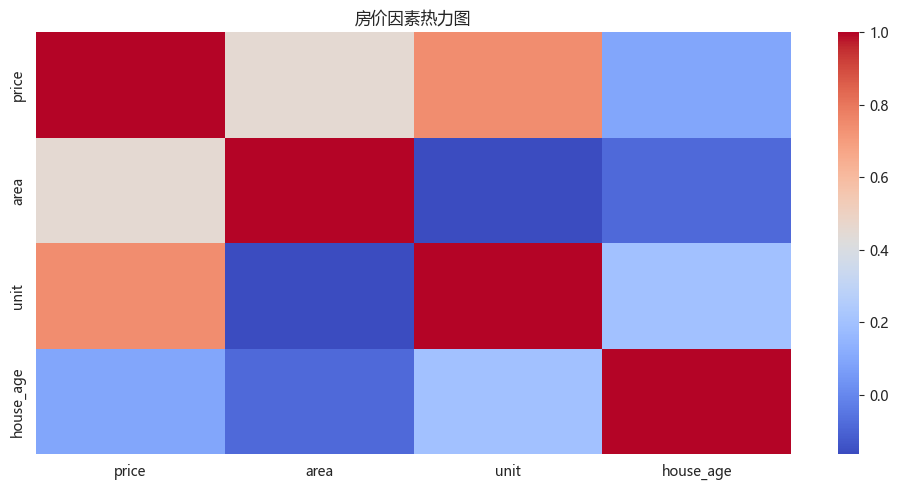
二、数据分析 - seaborn - 案例 1. 房地产市场洞察与数据评估(1)导入依赖(2)导入数据(3)数据概览(4)数据清洗(5)新数据特征构造(6)问题分析及可视化import numpy as np import matplotlib.pyplot as plt import pandas as pd import seaborn as sns import datetime from matplotlib import rcParams rcParams['font.family'] = 'Microsoft YaHei'df = pd.read_csv('static/2_pandas/data/house_sales.csv', encoding='utf-8') print("总记录数:", len(df)) print("字段数数:", len(df.columns)) print(df.head(10)) print() df.info() 总记录数: 106118 字段数数: 12 city address area floor name price province \ 0 合肥 龙岗-临泉东路和王岗大道交叉口东南角 90㎡ 中层(共18层) 圣地亚哥 128万 安徽 1 合肥 龙岗-临泉东路和王岗大道交叉口东南角 90㎡ 中层(共18层) 圣地亚哥 128万 安徽 2 合肥 生态公园-淮海大道与大众路交口 95㎡ 中层(共18层) 正荣·悦都荟 132万 安徽 3 合肥 生态公园-淮海大道与大众路交口 95㎡ 中层(共18层) 正荣·悦都荟 132万 安徽 4 合肥 撮镇-文一名门金隅裕溪路与东风大道交口 37㎡ 中层(共22层) 文一名门金隅 32万 安徽 5 合肥 撮镇-文一名门金隅裕溪路与东风大道交口 37㎡ 中层(共22层) 文一名门金隅 32万 安徽 6 合肥 龙岗-长江东路与和县里交口 50㎡ 高层(共30层) 柏庄金座 46万 安徽 7 合肥 龙岗-长江东路与和县里交口 50㎡ 高层(共30层) 柏庄金座 46万 安徽 8 合肥 新亚汽车站-张洼路与临泉路交汇处向北100米(原红星机械 120㎡ 中层(共27层) 天目未来 158万 安徽 9 合肥 新亚汽车站-张洼路与临泉路交汇处向北100米(原红星机械 120㎡ 中层(共27层) 天目未来 158万 安徽 rooms toward unit year \ 0 3室2厅 南北向 14222元/㎡ 2013年建 1 3室2厅 南北向 14222元/㎡ 2013年建 2 3室2厅 南向 13895元/㎡ 2019年建 3 3室2厅 南向 13895元/㎡ 2019年建 4 2室1厅 南北向 8649元/㎡ 2017年建 5 2室1厅 南北向 8649元/㎡ 2017年建 6 2室1厅 南向 9200元/㎡ 2019年建 7 2室1厅 南向 9200元/㎡ 2019年建 8 4室2厅 南向 13167元/㎡ 2012年建 9 4室2厅 南向 13167元/㎡ 2012年建 origin_url 0 https://hf.esf.fang.com/chushou/3_404230646.htm 1 https://hf.esf.fang.com/chushou/3_404230646.htm 2 https://hf.esf.fang.com/chushou/3_404304901.htm 3 https://hf.esf.fang.com/chushou/3_404304901.htm 4 https://hf.esf.fang.com/chushou/3_404372096.htm 5 https://hf.esf.fang.com/chushou/3_404372096.htm 6 https://hf.esf.fang.com/chushou/3_398859799.htm 7 https://hf.esf.fang.com/chushou/3_398859799.htm 8 https://hf.esf.fang.com/chushou/3_381138154.htm 9 https://hf.esf.fang.com/chushou/3_381138154.htm <class 'pandas.core.frame.DataFrame'> RangeIndex: 106118 entries, 0 to 106117 Data columns (total 12 columns): # Column Non-Null Count Dtype --- ------ -------------- ----- 0 city 106118 non-null object 1 address 104452 non-null object 2 area 105324 non-null object 3 floor 104024 non-null object 4 name 105564 non-null object 5 price 105564 non-null object 6 province 106118 non-null object 7 rooms 104036 non-null object 8 toward 105240 non-null object 9 unit 105564 non-null object 10 year 57736 non-null object 11 origin_url 105564 non-null object dtypes: object(12) memory usage: 9.7+ MB# 数据清洗 df.drop(columns=['origin_url'], inplace=True) # df.head() # 缺失值处理 df.isna().sum() # 可选操作 df.dropna(inplace=True) # 删除重复数据 df.drop_duplicates(inplace=True) print(len(df)) 28104# 面积数据类型转换 df['area'] = df['area'].str.replace('㎡', '').astype(float) # 售价数据类型转换 df['price'] = df['price'].str.replace('万', '').astype(float) # 朝向数据类型转换 df['toward'] = df['toward'].astype('category') # 单价格数据类型转换 df['unit'] = df['unit'].str.replace('元/㎡', '').astype(float) # 年份格数据类型转换 df['year'] = df['year'].str.replace('年建', '').astype(int)# 异常值处理 # 房屋面积 df = df[(df['area'] > 20) & (df['area'] < 600)] # 价格 IQR Q1 = df['price'].quantile(0.25) Q3 = df['price'].quantile(0.75) IQR = Q3 - Q1 low_price = Q1 - 1.5 * IQR high_price = Q3 + 1.5 * IQR df = df[(df['price'] > low_price) & (df['price'] < high_price)]# 新数据特征构造 # 地区 district df['district'] = df['address'].str.split('-').str[0] # 楼层类型 floor_type df['floor_type'] = df['floor'].str.split('(').str[0].astype('category') # 是否是直辖市 zxs def is_zxs(city): if (city in ['北京', '上海', '天津', '重庆']): return True else: return False df['zxs'] = df['city'].apply(lambda x: 1 if is_zxs(x) else 0) # 卧室数 bedroom_num df['bedroom_num'] = df['rooms'].str.split('室').str[0].astype(int) # 客厅数量 living_room_num # df['living_room_num'] = df['rooms'].str.split('室').str[1].str.split('厅').str[0].fillna(0).astype(int) df['living_room_num'] = df['rooms'].str.extract(r'(\d+)厅').fillna(0).astype(int) # 房龄 house_age df['house_age'] = datetime.datetime.now().year - df['year'] # 价格区间 price_interval df['price_interval'] = pd.cut(df['price'], bins=3, labels=['低', '中', '高'])""" 分析一:哪些变量最影响房价?面积、楼层、房间数哪个因素影响最大? 分析主题:特征性相关 分析目标:各因素对房价的线性影响 分组字段:无 指标/方法:皮尔逊相关系数 """ # 选择数值型特征 # corr() 相关系数 corr = df[['price', 'area', 'unit', 'house_age']].corr() print("影响房价的因素:") print(corr['price'].sort_values(ascending=False)[1:]) # 相关性热力图 plt.figure(figsize=(10, 5)) sns.heatmap(corr, cmap='coolwarm') plt.title('房价因素热力图') plt.tight_layout()影响房价的因素: unit 0.742731 area 0.452523 house_age 0.091520 Name: price, dtype: float64""" 分析二:全国房价的总体分布,是否存在极端值 分析主题:描述性统计 分析字段:概览数值型字段的分布特征 分组字段:无 指标/方法:平均数/中位数/四分位数/标准差 """ print(df.describe()) # 房价分布直方图 plt.subplot() plt.hist(df['price'], bins=10) area price unit year zxs \ count 26135.000000 26135.000000 26135.000000 26135.000000 26135.000000 mean 103.755810 117.208370 11610.131012 2013.072240 0.008800 std 33.995994 60.967675 5824.245273 6.019342 0.093399 min 21.000000 9.000000 1000.000000 1976.000000 0.000000 25% 85.005000 72.000000 7587.000000 2011.000000 0.000000 50% 100.000000 103.000000 10312.000000 2015.000000 0.000000 75% 123.000000 150.000000 14184.000000 2017.000000 0.000000 max 470.000000 306.000000 85288.000000 2023.000000 1.000000 bedroom_num living_room_num house_age count 26135.000000 26135.000000 26135.000000 mean 2.714444 1.848556 11.927760 std 0.800768 0.407353 6.019342 min 0.000000 0.000000 2.000000 25% 2.000000 2.000000 8.000000 50% 3.000000 2.000000 10.000000 75% 3.000000 2.000000 14.000000 max 9.000000 12.000000 49.000000 (array([ 991., 4810., 6499., 4613., 3362., 2226., 1333., 1055., 691., 555.]), array([ 9. , 38.7, 68.4, 98.1, 127.8, 157.5, 187.2, 216.9, 246.6, 276.3, 306. ]), <BarContainer object of 10 artists>)sns.histplot(data=df, x='price', bins=10, kde=True)<Axes: xlabel='price', ylabel='Count'>""" 分析三:南北向是否比单一朝向贵?贵多少? 分析主题:朝向溢价 分析目标:评估不同朝向的价格差异 分组字段:toward 指标/方法:方差分析/多重比较 """ print(df['toward'].value_counts()) toward 南北向 14884 南向 8796 东南向 974 东向 419 北向 258 西南向 254 西向 161 东西向 151 西北向 133 东北向 105 Name: count, dtype: int64print(df.groupby('toward', observed=False).agg({ 'price': ['mean', 'median'], 'unit': 'median', 'house_age': 'mean' })) price unit house_age mean median median mean toward 东北向 114.555333 100.0 12198.0 12.609524 东南向 115.542608 105.0 10864.0 10.951745 东向 110.158568 95.0 11421.0 12.761337 东西向 98.935099 82.0 9000.0 15.490066 北向 92.527907 75.5 11698.0 13.108527 南北向 119.472147 104.5 10000.0 12.073703 南向 114.555016 103.0 10759.0 11.551160 西北向 119.107594 105.0 12290.0 13.473684 西南向 139.711811 138.4 13333.0 13.452756 西向 102.662298 86.0 12528.0 13.385093plt.figure(figsize=(10, 5)) sns.boxplot(data=df, x='toward', y='price') plt.tight_layout()
-
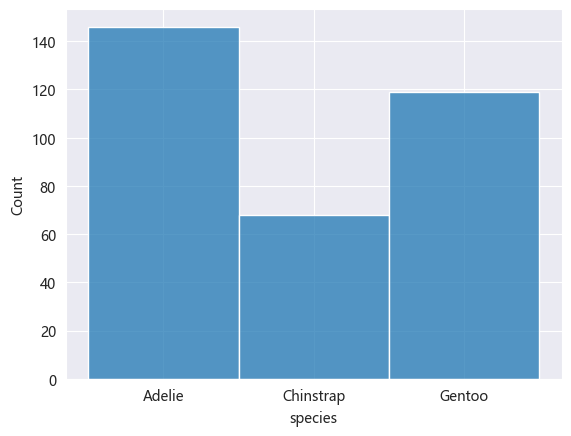
一、数据分析 - seaborn # 安装依赖 pip install seaborn一、统计图import pandas as pd import seaborn as sns import matplotlib.pyplot as plt from matplotlib import rcParams rcParams['font.family'] = 'Microsoft YaHei' # 设置图表大小 plt.figure(figsize=(10, 5)) # data penguins = pd.read_csv('static/2_pandas/data/penguins.csv') penguins.dropna(inplace=True) # penguins.head()1. 直方图sns.histplot(data=penguins, x='species') <Axes: xlabel='species', ylabel='Count'>2. 核密度估计图核密度估计图(KDE,Kernel Density Estimate Plot)用于显示数据分布,其通过平滑直方图的方法来估计数据的概率密度函数,使得分布图看起来更加连续、平滑。核密度估计是一种非参数方法,用于估计随机变量的概率密度函数。其基本思想是将每个数据点视为一个”核(高斯分布)“,然后将这些核的贡献相加以构成平滑的密度曲线。# 喙长度 - 核密度估计图 sns.kdeplot(data=penguins, x='bill_length_mm') <Axes: xlabel='bill_length_mm', ylabel='Density'>sns.histplot(data=penguins, x='bill_length_mm', kde=True) <Axes: xlabel='bill_length_mm', ylabel='Count'>3. 计数图计数图用于绘制分类变量的计数分布图,显示每个类别在数据集中出现的次数,可以快速了解类别的分布情况。# 不同岛屿的企鹅分布数量 sns.countplot(data=penguins, x='island') <Axes: xlabel='island', ylabel='count'>4. 散点图# x:体重,y:脚蹼长度 # hue参数可设置通过不同”分类“进行比对 sns.scatterplot(data=penguins, x='body_mass_g', y='flipper_length_mm', hue='sex') <Axes: xlabel='body_mass_g', ylabel='flipper_length_mm'>5. 蜂窝图# kind='hex' sns.jointplot(data=penguins, x='body_mass_g', y='flipper_length_mm', kind='hex') <seaborn.axisgrid.JointGrid at 0x239c7cddc40>6. 二维核密度估计图# 同时设置参数x和y sns.kdeplot(data=penguins, x='body_mass_g', y='flipper_length_mm') <Axes: xlabel='body_mass_g', ylabel='flipper_length_mm'># fill 填充 # cbar 颜色示意条 sns.kdeplot(data=penguins, x='body_mass_g', y='flipper_length_mm', fill=True, cbar=True) <Axes: xlabel='body_mass_g', ylabel='flipper_length_mm'>7. 条形图sns.barplot(data=penguins, x='species', y='bill_length_mm', estimator='mean', errorbar=None) <Axes: xlabel='species', ylabel='bill_length_mm'>8. 箱线图sns.boxplot(data=penguins, x='species', y='bill_length_mm') <Axes: xlabel='species', ylabel='bill_length_mm'>9. 小提琴图小提琴图(Violin Plot)是一种结合了箱线图和核密度估计图的可视化图表,用于展示数据的分布情况、集中趋势、散布情况以及异常值,不仅可以显示数据的基本统计量(中位数、四分位数等),还可以展示数据的概率密度。sns.violinplot(data=penguins, x='species', y='bill_length_mm') <Axes: xlabel='species', ylabel='bill_length_mm'>10. 成对关系图成对关系图是一种用于显示多个变量之间关系的可视化图表,其对角线上的图通常显示每个变量的分布,即单变量特性,其他位置的图用于展示所有变量的两两关系。sns.pairplot(penguins, hue='species') <seaborn.axisgrid.PairGrid at 0x239c979de20>
-
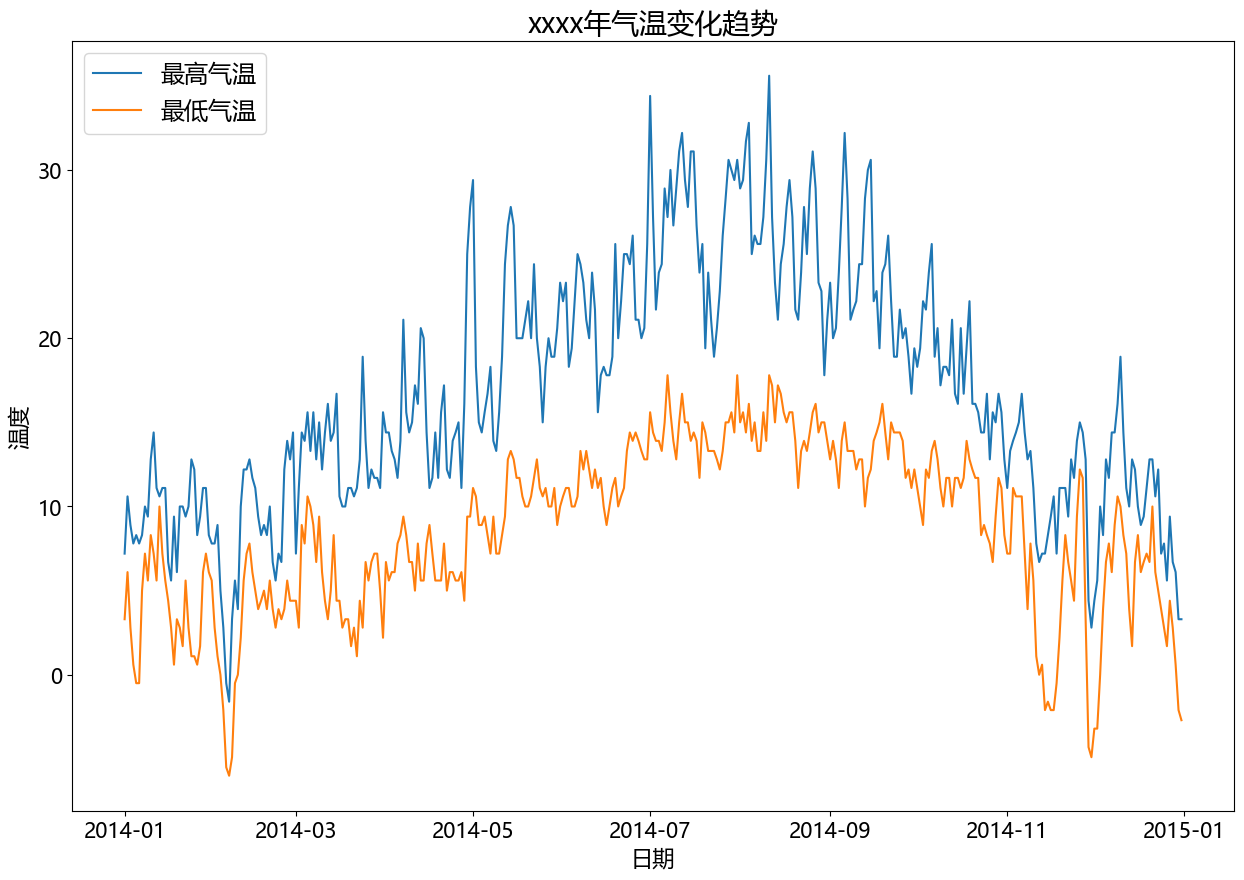
二、matplotlib - 统计图 - 案例 (1)温度、降水量分析import pandas as pd import matplotlib.pyplot as plt from matplotlib import rcParams rcParams['font.family'] = 'Microsoft YaHei' # data df = pd.read_csv('static/2_pandas/data/weather.csv') # print(df.head()) df['date'] = pd.to_datetime(df['date']) df = df[df['date'].dt.year == 2014] # 设置图表大小 plt.figure(figsize=(15, 10)) # 气温趋势变化图 plt.plot(df['date'], df['temp_max'], label='最高气温') plt.plot(df['date'], df['temp_min'], label='最低气温') plt.title('xxxx年气温变化趋势', fontsize=20) plt.legend(loc='upper left', fontsize='xx-large') plt.xlabel('日期', fontsize=16) plt.ylabel('温度', fontsize=16) plt.xticks(fontsize=15) plt.yticks(fontsize=15) plt.show()# 设置图表大小 plt.figure(figsize=(10, 5)) # 降水量直方图 data = df[df['date'].dt.year == 2014] plt.hist(data.precipitation, bins=5) plt.title('xxxx年降水量统计(直方图)', fontsize=16) plt.xlabel('降水量', fontsize=12) plt.ylabel('天数', fontsize=12) plt.show()